Sunday, 10 November 2024

Book release

 It was a privilege to be part of the book release for "Vakkukalude Kara,Kadal,Aksham; Oru Pusthaka Snehiyude Athma Rahasyangal" by M. Lukman, published by hashtag

Magicmoon, Delhi, at the hashtagSharjah_International_Book_Fair. The event was made memorable as renowned poet and journalist Kuzhur Wilson unveiled the book, presenting it to Mr. Muhammed Pallar, librarian at hashtagFujairah_University, in the presence of esteemed guests and dignitaries.


In this work, the author invites readers into his personal journey of reading, offering insights into iconic authors and their masterpieces across diverse literary landscapes. From the charm of children’s literature to the impactful voices of Palestinian authors, and from the depth of Arab and Muslim narratives to the vibrant storytelling of Nigerian writers, this book celebrates global literature. Readers can explore the wisdom of hashtagGandhiji, the philosophical reflections of hashtagMilan_Kundera, the insights of Nobel laureate hashtagAbdulrazak_Gurnah, and the captivating stories of hashtagAlice_Munro. Lukman also highlights literary greats such as hashtagEdward_Said, Tim Parks, Noam Chomsky, William Faulkner, Kahlil Gibran, hashtagHaruki_Murakami, and Roald Dahl, fostering a richer appreciation of their contributions.

This books is a valuable guide for both new and seasoned readers, a testament to the power of literature to inspire and transform

hashtagsibf hashtagSharjah_International_book_fair hashtagBook_release

Saturday, 26 October 2024

Conference at Muscat, Oman

 For years, my experience with Muscat in Oman was limited to airport transits—just a glimpse of the land through glass. Back in 2016, I remember using the airport's facilities to rest during a long layover, but Oman remained a mystery to me.


Fast-forward eight years, and last month I had the opportunity to not only visit Oman but also participate in the Wiki Arabia Conference. This experience was truly eye-opening. I connected with passionate Omani citizens deeply rooted in their traditions and immensely proud of their culture and had sharing a dinner with them, during which they spoke about the ancient history of the Sultanate of Oman, their customs, and the country's journey of economic development.


This journey reminded me of a powerful lesson: when you focus on developing what you’re truly good at, you can exceed your own expectations.

At the conference, I presented on automated edits (bots) using Python frameworks for Wikimedia projects, showcasing how these tools have been used for formatting and editing on Arabic Wikisource. A special thanks to my co-host and friend Mohammad Hijjawi for collaborating with me on Arabic translations, and for helping me connect with many friends BRAHIM FARAJI, ( Both of them captured photographs too) Ali Khalil etc... from the MENA region.

Gratitude to hashtagWikimedians_of_UAE and hashtagJahzeen_Foundation for making this experience possible. Oman, your hospitality and stories have left a lasting impression on me!
Thank you Reda Kherbouche, Serine Ben Brahim Manavpreet Kaur,Er. Jinoy Tom Jacob,Duaa Khidir Vipin SJ,Florence Devouard.

Sunday, 29 September 2024

PAWS in Wikisource

Add page number 

import pywikibot

# Set the site to Malayalam Wikisource
site = pywikibot.Site('ml', 'wikisource')

# Loop through pages 16 to 30
for i in range(16, 31):
    # Set the correct page title
    page_title = f'à´¤ാൾ:à´¸ുà´µിà´¶േà´·ം-à´­ാà´·ാà´—ാà´¨ം.pdf/{i}'
    page = pywikibot.Page(site, page_title)

    # Set the content as the incrementing page number (starting from 12)
    page_number = i - 4  # This will give 12 for page 16
    content = f'<div style="text-align: center;">{page_number}</div>'

    # Check if the page exists
    if page.exists():
        # If the page exists, add content at the top
        new_content = content + "\n" + page.text
        page.text = new_content
        page.save(f"Added page number {page_number} at the top center")
    else:
        # If the page does not exist, create it with the content
        page.text = content
        page.save(f"Created page and added page number {page_number} at the top center")
        print(f"Page '{page_title}' was created.")

Saturday, 24 August 2024

GLAM Wiki Training at Kondotty

It was a pleasure to conduct a workshop on the GLAM and Eduwiki programs at Imam Bukhari Institute in Kondotty, India. The event was organized by the Students’ Association of Bukhari Da’wa College.


Kondotty has a rich history in Mappila art and literature. Notably, Mahakavi Moyinkutty Vaidyar, born in 1852, was a renowned poet and Ayurvedic practitioner from this region. He composed the romantic epic “Badarul Munir – Husnul Jamal” at just 17 years old.

During the workshop, 40 students participated, with some already contributing to Wikimedia Commons and Wikisource by uploading traditional Mappila songs and literary works. They are excited to continue contributing to Wikimedia with more cultural and literary content.

hashtag#GLAM hashtag#Eduwiki hashtag#Edu

Activate to view larger image,


Sunday, 9 June 2024

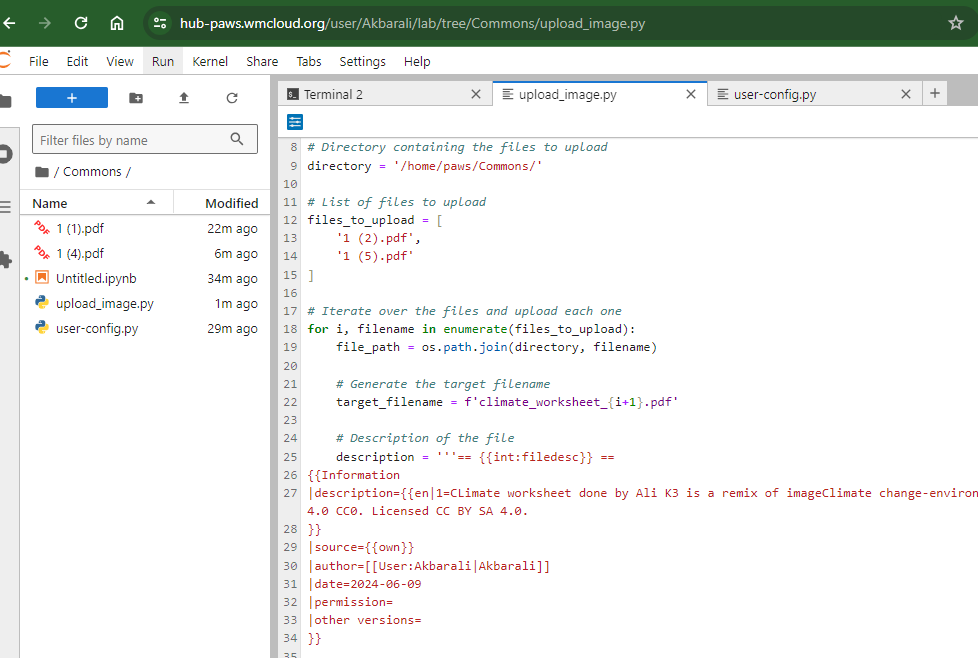
PAWS and Commons

 File Uploading to commons


Steps

Log in PAWS

Upload all files that are to be uploaded to commons in a folder.

For example : Here folder name is :Commons

I uploaded all pdf files there.


Then Create a python file : Example in the same folder.

I saved as upload_image.py  (You can have your own names)

Step 2

Paste the following code

import os

import pywikibot

from pywikibot.specialbots import UploadRobot


# Define the site

site = pywikibot.Site('commons', 'commons')


# Directory containing the files to upload

directory = '/home/paws/Commons/'


# List of files to upload

files_to_upload = [

    '1 (2).pdf',

    '1 (5).pdf'

]


# Iterate over the files and upload each one

for i, filename in enumerate(files_to_upload):

    file_path = os.path.join(directory, filename)


    # Generate the target filename

    target_filename = f'climate_worksheet_{i+1}.pdf'


    # Description of the file

    description = '''== {{int:filedesc}} ==

{{Information

|description={{en|1=CLimate worksheet done by Ali K3 is a remix of imageClimate change-environment.jpgby user:U3196787CC-BY-SA-4.0 CC0. Licensed CC BY SA 4.0.

}}

|source={{own}}

|author=[[User:Akbarali|Akbarali]]

|date=2024-06-09

|permission=

|other versions=

}}


== {{int:license-header}} ==

{{self|cc-by-sa-4.0}}


[[Category:Climate Educational worksheets]]

[[Category:Open Remix: Exploring Knowledge and Cultural Creativity]]

[[Category:Map worksheets]]

[[Category:Educational resources]]

[[Category:Humanities]]


'''


    # Create an instance of the upload bot

    bot = UploadRobot(url=[file_path],

                      description=description,

                      use_filename=target_filename,

                      keep_filename=True,

                      verify_description=False,

                      target_site=site)


    # Run the upload bot

    bot.run()

Step 3
Open Terminal and enter the following

@PAWS:~/Commons$ python upload_image.py  


NB: Give proper file names