Showing posts with label wikicommons query. Show all posts

Sunday, 9 June 2024

PAWS and Commons

 File Uploading to commons
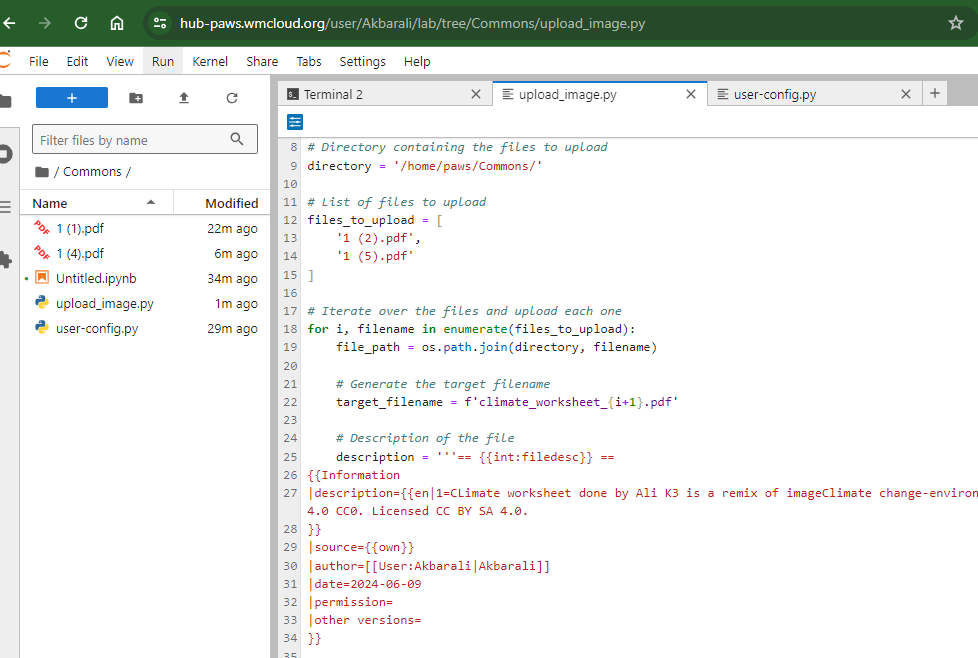


Steps

Log in PAWS

Upload all files that are to be uploaded to commons in a folder.

For example : Here folder name is :Commons

I uploaded all pdf files there.


Then Create a python file : Example in the same folder.

I saved as upload_image.py  (You can have your own names)

Step 2

Paste the following code

import os

import pywikibot

from pywikibot.specialbots import UploadRobot


# Define the site

site = pywikibot.Site('commons', 'commons')


# Directory containing the files to upload

directory = '/home/paws/Commons/'


# List of files to upload

files_to_upload = [

    '1 (2).pdf',

    '1 (5).pdf'

]


# Iterate over the files and upload each one

for i, filename in enumerate(files_to_upload):

    file_path = os.path.join(directory, filename)


    # Generate the target filename

    target_filename = f'climate_worksheet_{i+1}.pdf'


    # Description of the file

    description = '''== {{int:filedesc}} ==

{{Information

|description={{en|1=CLimate worksheet done by Ali K3 is a remix of imageClimate change-environment.jpgby user:U3196787CC-BY-SA-4.0 CC0. Licensed CC BY SA 4.0.

}}

|source={{own}}

|author=[[User:Akbarali|Akbarali]]

|date=2024-06-09

|permission=

|other versions=

}}


== {{int:license-header}} ==

{{self|cc-by-sa-4.0}}


[[Category:Climate Educational worksheets]]

[[Category:Open Remix: Exploring Knowledge and Cultural Creativity]]

[[Category:Map worksheets]]

[[Category:Educational resources]]

[[Category:Humanities]]


'''


    # Create an instance of the upload bot

    bot = UploadRobot(url=[file_path],

                      description=description,

                      use_filename=target_filename,

                      keep_filename=True,

                      verify_description=False,

                      target_site=site)


    # Run the upload bot

    bot.run()

Step 3
Open Terminal and enter the following

@PAWS:~/Commons$ python upload_image.py  


NB: Give proper file names

Wednesday, 29 March 2023

Commons Query

 To Get file names that are not available in your languae

Link


Codes

SELECT ?file ?title ?captionEn ?captionMl ?img_

WITH

{

  SELECT ?file ?title

  WHERE

  {

    SERVICE wikibase:mwapi

    {

      bd:serviceParam wikibase:api "Search" .

      bd:serviceParam wikibase:endpoint "commons.wikimedia.org" .

      bd:serviceParam mwapi:srsearch "deepcategory:\"Otto von Bismarck by year\" prefix:File:" .

      bd:serviceParam mwapi:srlimit "max" .

      ?title wikibase:apiOutput mwapi:title .

      ?pageid wikibase:apiOutput "@pageid" .

    }

    BIND (URI(CONCAT('https://commons.wikimedia.org/entity/M', ?pageid)) AS ?file)

  }

} AS %get_files

WHERE

{

  INCLUDE %get_files

  # ?file wdt:P180 ?depicts ?img_.

  # service <https://query.wikidata.org/sparql> {

  #   OPTIONAL {?depicts rdfs:label ?depicts_label FILTER (lang(?depicts_label) = 'en') } 

  # }

  OPTIONAL { ?file rdfs:label ?captionEn FILTER (lang(?captionEn) = 'en') }

  OPTIONAL { ?file rdfs:label ?captionMl FILTER (lang(?captionMl) = 'ml') }

    optional {

    ?item wdt:P18 ?img_ .

  }

  bind (if(bound(?img_), 

           ?img_, 

           <http://commons.wikimedia.org/wiki/Special:FilePath/File:Profile_avatar_placeholder_large.png>) as ?image)

} order by desc(?date)

Tuesday, 10 January 2023

Items that do not have labels in ml

 Query 

https://w.wiki/6D4n 

Wednesday, 30 September 2020

 Querey

SELECT ?image 

WITH

{

  SELECT ?item

  WHERE

  {

    SERVICE <https://query.wikidata.org/sparql>

    {

      ?item wdt:P39 wd:Q11696 .  # position held: President of the United States

    }

  } 

} AS %get_items

WHERE

{

  INCLUDE %get_items

  ?image wdt:P180 ?item .

  FILTER NOT EXISTS { ?image rdfs:label ?label. FILTER (LANG(?label) = "ml") }

}